Showing posts with label WebAppSec. Show all posts

Saturday, 2 May 2015


Introduction

Node.JS is a Cross Platform and Runtime Environment Where one can execute javascript code, outside the Web Browser. Node.JS is Very helpful but it has a couple of Killing features which make it very dangerous and hazardous for a web application. In this tutorial we are going to discuss one of them, Command Execution in Node.JS, You Folks must know what is Command Execution but just to be sure I’d like to tell you, Command Execution Vulnerabilities Allow an Attacker to run arbitrary Commands on a System through the Vulnerable Environment. I guess its enough for introcution.

Vulnerable Code

Here is vulnerable code which demonstrates the vulnerability in node js.

Node JS Command Execution Pentesting


I’ll simply give the overview about where exactly its getting hectic. We are using exec function from child_process library, and executing parsedUrl.query.command, that is not getting filtered. Hence an attacker can execute any arbitrary commdn in order to hack into system. Let’s Save it and run it. Here is my script running.

Node JS Command Execution Pentesting


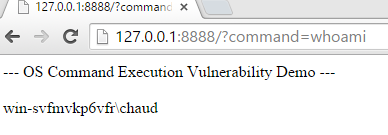
Code is working without any error, let’s try to visit the url 127.0.0.1:8888 in browser as it is listening on port 8888.


Node JS Command Execution Pentesting


Whoa, we got it working. Now its time to do some evil stuff. Let’s try to execute systeminfo, PING & Some other commands , that displays information about a computer.
#fig1

Node JS Command Execution Pentesting

#fig2

Node JS Command Execution Pentesting

#fig3

Node JS Command Execution Pentesting


Okay fine, as it is clear from the above POC that its working exactly fine. In this context a developer must be careful while working with Node.JS files as its kinda more hectic and Evil than other languages.

About the Author


Muhammad Adeel is a Security researcher & Founder at Whitehat Conference Pakistan, he Blogs at http://urdusecurity.blogspot.com

Node JS & Command Execution

By: Adeel Chaudhary on: 06:53

Saturday, 27 December 2014

cross site tracing

Hey Folks, Let's Have a little look over Cross Site Tracing though many of you know as it is simple and easiest way but still for some of you who don't know what it is. M gonna Demonstrate.

Introduction

XST (Cross Site Tracing) is combined Attack that includes HTTP TRACE METHOD and XSS Techniques. XST Allows an Attacker to see what data is being recieved at the other end of the request chain. its an old attack type that was discovered in the late of 2003. well i think its enough for now, Let's move to practical as always UrduSecurity do.

Cross Site Tracing

Well Guys First of all I need a Web server to whom I've to send the request so for this im gonna use my Localhost on port 81. and Let's Try to access it via curl.
curl -X TRACE 192.168.1.3:81
ok now let's see what is in response.

cross site tracing 

Umph As we can see TRACE in response so this method is allowed. Now Let's try to Add a new header if we can do it by using curl's -H option.

cross site tracing

oh ?? injected :P , so this application is prone to xss attacks via Trace method that is inshort called Cross Site Tracing. If we don't see TRACE in response and see a source page then trace method is disabled.

Hope it's Clear.

Cross Site Tracing | WebAppSec

By: Adeel Chaudhary on: 04:08

Sunday, 23 November 2014


CRLF Injection


Introduction

CRLF(Carriage Return Line Feed) Injection is another Web Application Vulnerability which occures due to improper input sanitization in headers fields of a website like, Location, User-agent, Max-Age etc. This vulnerability can cause some highly risky vulnerabilities like XSS, LFI Etc.


Scene Behind CRLF

CR & LF are 2 characters that indicates the end of a line. If we type something in any text Editor and just hit the ENTER key, the Editor automatically adds CR & LF at the End of That Line. as an Example See Below:


Sometimes You might have seen them written like this \r\n, This is Exactly what is CRLF. They are written as %0d%0a also when writing in hex.


Exploitation

Exploiting This Vulnerability is really easy and it has targeted high profile sites like google, yahoo, microsoft Etc. Ummm Let's Take an Example Page and send a request to it Then check the http request and response via Burp suite.


Let's Save and visit this Page via browser. and intercept its http request & response via burp.

Request:


i just forwarded the request and response was something like this.


Then i manipulated the Location Header and replaced Google.com with My Localhost Address Hosted Script. See Below.

Script:


Manipulated Response:


and after clicking forward i just saw that it amazingly redirected me to my localhost script instead of google as mentioned in code. see picture.


so in this way as we can clearly see that we are able to change and manipulate the http response and request using crlf injection. we further can add our own headers and other stuff if input is not being sanitized properly. We Have also an option to Inject CRLF into headers by doing uaing following payload cache-control= private%0d%0aNew-Header:Hacked%0d%0a , soin this way by applying CRLF technique we can inject it.


Remediations

Just sanitize the CRLF characters before they pass from header or also sanitize the encoding formates which let's crlf codes be injected into header.

CRLF Injection - Inject the Headers

By: Adeel Chaudhary on: 07:22

Wednesday, 9 July 2014

Web Vulnerability Scanner

Hello Guys, As You all Know That Lately I've Launched My Own Tool For Web App Vuln Scanning Purposes, that is Pentester-ToolKit & You can Download it From the Link Given Below.

Download Pentester-Toolkit

Its Much Efficient and Supports a handsome number of Modern Day Attack Scanning So its very beneficial for Security researchers or Website Masters in order to Secure Their Websites From Modern Day Attacks. Also I'll Keep Updating it with New Tools for Making it more efficient for the People.

Scanning Options

Here is a List of Scans Which it can Do.

  1. Check For Server Info
  2. Check HTTPOnly Flag
  3. Check X-Frame-Options
  4. Check For X-XSS-Protection
  5. Check X-Content-Type Options
  6. Check SSL/TLS Security
  7. Check Content Secret Policy
  8. Check Access Control Flaws
  9. Check XDownload Options
  10. Check Cache Control Options
  11. Check DNS MisConfiguration
  12. Check BackUp Abusement
  13. Check Remote Code Execution
  14. Check Cross Site Scripting
  15. Check Error Based SQLi
  16. Check For Directory Traversal
  17. check For HTTP Trace Methods
  18. Check For All Attacks

How to Install

Now comes the Point of My writing this Tutorial Because I got Many Many requests from friends that Post a tutorial on How to Use This toolkit , So Here is the Procedure for Linux & Windows. 

ON Linux

 First of all Open Terminal on Your Linux Distro & Follow the Steps Given below.

  1. sudo easy_install requests
  2. git clone https://github.com/Chaudhary-Adeel/Pentester-Toolkit.git
  3. cd Pentester-Toolkit
  4. chmod +x *
  5. python main.py

and Finally You'r Done with Using Pentester Toolkit, You'll see The Pentester Toolkit Screen interface waiting for you to Command it and Operate as u want.

ON Windows

On Windows You Have to Download Some Basic Things in Order to Use This Tool Kit, Here are Mentioned.
Now That You Have All the Stuff Ready, So Follow the Steps Below,

  1. Extract & install Python 2.7
  2. Now Extract & Copy Python Setup Tools in C:\ Directory
  3. Now Open Command Prompt & Follow Steps
  4. Move to Setup Tools Directory By this Command: cd setuptools-0.9.8
  5. Now Give Command: python setup.py install 

It will install python setup-tools for and a directory named "Script" will be created in your python installation directory.For default installation path, this is newly created directory C:\Python27\Scripts.

Now Again Follow Steps

  1. Give Following Command in Command Prompt: cd C:\Python27\Scripts
  2. Now install requests By Following Command: easy_install.exe requests
  3. After Doing this, Extract Pentester Toolkit in This Directory: C:\Python27
  4. and Try to Execute This Command: python main.py
  5. Bingooo You've Installed it Successfully 


If You Still Have Any Problem in it, Let me Know Via Comments. 

Thanks
 

Playing with Pentester-Toolkit on Windows & Linux

By: Adeel Chaudhary on: 23:44

Wednesday, 2 July 2014

UrduSecurity

Hello Readers, Currently I've Described an Introduction to HttpOnly Cookies. in This Video you'll Learn How to Check a website For Http Only Flag.


incase of Queries Comment down Below the Post.

Pentesting HttpOnly Cookies

By: Adeel Chaudhary on: 03:51


Greetings Gentel Men, I'm here to Give a Simple & Understandable concept of HttpOnly Falg. First time This Technique was used by MS-IE Developers in IE-6 with XP-sp1 Version.

HttpOnly

HttpOnly is an Additional Flag in Http Header Response named as set-cookie. and Usually using this httponly falg help in mitigating client side & server side Attacks.

Syntax:
 
Set-Cookie: name=UrduSecuirty; Max-Age=600; expires=01/04/2014; domain=urdusecurity.blogspot.com; path=/; secure; HttpOnly

Why HttpOnly


HttpOnly flag 'hypertext transfer protocol' response header is additional in, the cookie can't be accessed through consumer aspect script. As a result, a cross-site scripting flaw exists, and a user accidentally accesses a link that exploits this flaw even though the browser to a 3rd party cookie won't show.

 When we visit a web page and if We are Not able to see 'set-cookie' & 'HttpOnly' tags in response , be sure that website have no security becase its cookies can be stolen easily.

Setting HttpOnly Cookies

PHP => add this in PHP.ini
session.cookie_httponly = True
Python(CherryPy) =>add in Config File
session.cookie_httponly = True

Hope You Guys Enjoyed Reading this tutorial, its not briefly explained but its noob Friendly so that Every one can Understand. Soon I'l Post that how can we Access HttpOnly cookies Also. 

What & Why HttpOnly Flag

By: Adeel Chaudhary on: 01:13

 
Copyright © HACK | Designed by Muhammad Adeel | Founder UrduSecurity